

Patterns and Anti-Patterns in Unit Testing with JUnit and Mockito

Writing unit tests is not just about checking that code works today; it is about ensuring that it keeps working tomorrow when another developer (or you) makes a change. However, poorly structured, brittle, and hard-to-read test code can become a greater burden than the production code itself.
When tests constantly fail for reasons unrelated to business logic, teams lose confidence in them and eventually stop maintaining them. In this article, we will examine the most common antipatterns when writing tests in Java using JUnit and Mockito, and apply design patterns to turn them into clean, maintainable, and reliable tests.
What Defines a Clean Test?
Before fixing mistakes, we need to understand the goal. A clean test typically follows the FIRST principles:
- Fast: Tests should run in milliseconds. If they are slow, developers will avoid running them.
- Independent: A test should not depend on the result or state of another test.
- Repeatable: Tests should produce the same result on a local machine, on the CI/CD server, and in any environment.
- Self-Validating: The result should be a clear pass (green) or fail (red), without requiring manual log inspection.
- Timely: Tests should be written at the right time, ideally alongside (or before) the production code.
Below, we explore testing habits that break these rules and how to fix them.
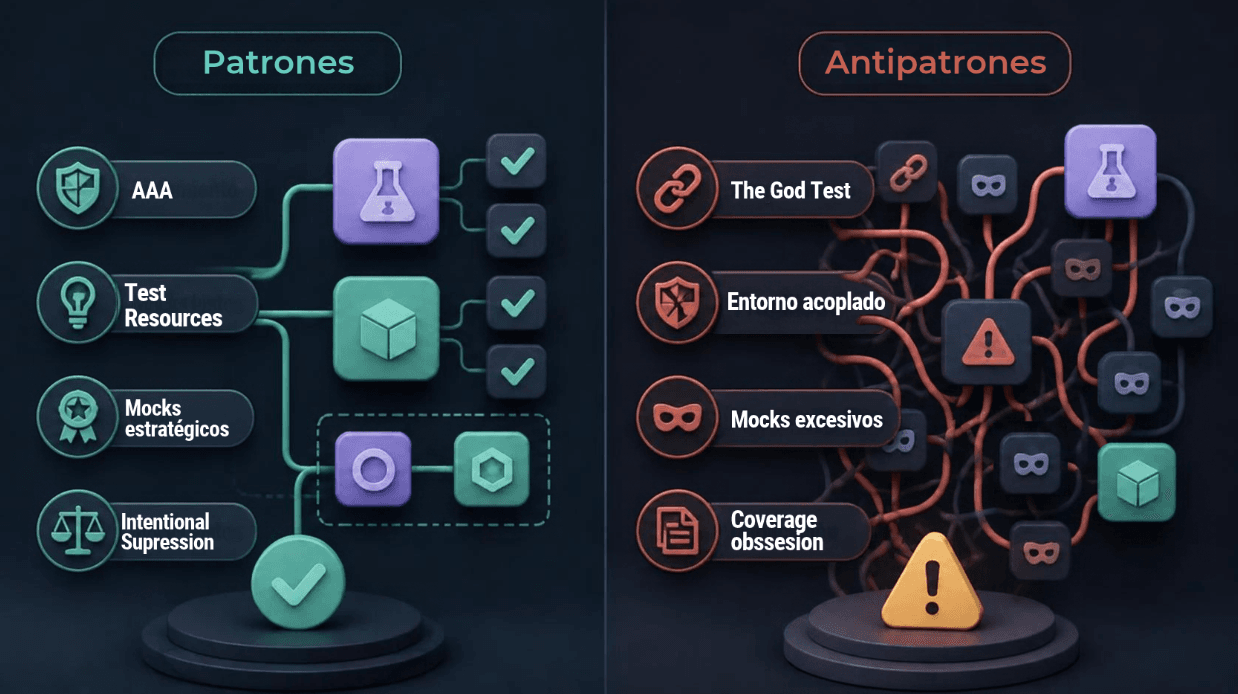
Antipattern 1: The God Test / Giant Test vs. Pattern: Arrange-Act-Assert (AAA)
The Problem
A God Test is a monolithic test spanning hundreds of lines that attempts to verify multiple scenarios at once. It mixes data creation, execution, and dozens of assertions (assertEquals, assertTrue) without any structure. If this test fails, it is almost impossible to identify which specific functionality broke without using a debugger.
The Solution: The Arrange-Act-Assert (AAA) Pattern
The Arrange-Act-Assert pattern divides each test into three clearly defined logical and visual blocks. A test should verify a single behavior.
In the following example, the test takes on too much by checking the entire order-processing workflow. In a single test, it prepares the user and order data, executes the service, and validates multiple simultaneous side effects: updating the status to "PROCESADA", recording the timestamp, and notifying the user. By including multiple additional assertions across different workflows, it violates the single-responsibility principle for a unit test (Assertion Roulette), checking several independent behaviors instead of focusing on a single use case.
The Antipattern in Action:
Java
@Test
void testProcesarOrden() {
    // Confusing setup mixed with validations
    Orden orden = new Orden(1L, "Laptop");
    orden.setEstado("PENDIENTE");
    Usuario user = new Usuario("juan@test.com");
    orden.setUsuario(user);

    OrdenService service = new OrdenService(new NotificacionMock());
    service.procesar(orden);

    assertEquals("PROCESADA", orden.getEstado());
    assertNotNull(orden.getFechaProcesamiento());
    assertTrue(user.isNotificado());
    // ... 15 more assertions covering different workflows
}
The following code shows how the test specifically verifies that processing an order with a "PENDIENTE" status changes its status to "PROCESADA" and sends a notification to the user. In Arrange, it prepares the user and order and mocks the notification service; in Act, it executes the processing method; and in Assert, it checks only that the status is "PROCESADA" and that the notification was sent.
Applying the AAA Pattern:
Java
@Test
@DisplayName("Should change the order status to processed and notify the user")
void shouldProcessOrderAndNotifyUser() {
    // Arrange
    Usuario usuario = new Usuario("juan@test.com");
    Orden orden = new Orden(1L, "Laptop", usuario, "PENDIENTE");
    NotificacionService notificacionMock = mock(NotificacionService.class);
    OrdenService ordenService = new OrdenService(notificacionMock);

    // Act
    ordenService.procesar(orden);

    // Assert
    assertEquals("PROCESADA", orden.getEstado());
    verify(notificacionMock, times(1)).enviar(usuario);
}
Note: Using @DisplayName in JUnit 5 or descriptive method names greatly improves readability when a test failure appears in the console.
Antipattern 2: Configuration Leakage vs. Pattern: Configuration Isolation
The Problem
An extremely frustrating scenario (very common in Spring Boot applications) occurs when tests pass on your machine but fail in another developer's environment or in the pipeline. This often happens because the tests are reading the application.properties file from the main resources directory (src/main/resources). If someone changes a database URL, a token, or a timeout in production, the tests mysteriously break. This violates the Repeatable principle.
The Solution: Isolation with Test Resources
For tests to be deterministic, they need their own isolated environment. In Java projects (Maven/Gradle), the src/test/resources directory takes precedence over src/main/resources during testing.
Implementation Best Practices:
- Controlled duplication: Create a dedicated application.properties or application.yml file in src/test/resources.
- Use profiles: Use test-specific profiles through the @ActiveProfiles("test") annotation.
Java
@SpringBootTest
@ActiveProfiles("test") // Forces Spring to read application-test.yml
class FacturacionServiceTest {

    @Value("${api.external.timeout}")
    private int timeout; // Always fixed in tests, regardless of production settings

    @Test
    void shouldCalculateInvoiceCorrectly() {
        // Test logic with predictable configuration
    }
}
This pattern ensures that the test environment remains unaffected by operational configuration changes in the main codebase.
Antipattern 3: Over-mocking / Mocking the World vs. Pattern: Strategic Mocking (Boundary Mocking)
The Problem
With tools as powerful as Mockito, it is tempting to use @Mock for absolutely everything. The Over-mocking antipattern occurs when a developer mocks not only external dependencies but also domain objects (DTOs, entities) and internal logic. The result is a test that "passes" but does not test anything real; it is testing the mock's own configuration.
The Solution: Strategic Mocking
This pattern establishes a clear rule: mock dependencies, but use real instances for data.
Mocks should only be used to isolate the class under test from slow or volatile external components (databases, third-party APIs, message queues).
The Antipattern:
Java
@Test
void calcularTotalEnDolares_antipatron() {
    // BAD: Mocking a simple data structure
    Pedido pedidoMock = mock(Pedido.class);
    when(pedidoMock.getTotalLocal()).thenReturn(50000.0);
    when(pedidoMock.getMonedaOriginal()).thenReturn("COP");

    // GOOD: Mock ONLY external dependencies or resource-intensive processes

    ServicioDeCambio servicioCambioMock = mock(ServicioDeCambio.class);
    when(servicioCambioMock.obtenerTasaDolar("COP")).thenReturn(0.00025);

    ProcesadorDePagos procesador = new ProcesadorDePagos(servicioCambioMock);

    double totalDolares = procesador.calcularTotalEnDolares(pedidoMock);

    assertEquals(12.5, totalDolares);
}
The Pattern:
Here, we apply the best practice. We instantiate a real Pedido because its state is predictable and resides in memory. We only mock ServicioDeCambio because we do not want our unit test to depend on an internet connection or a third-party API.
Java
@Test
void calcularTotalEnDolares_patron() {
    // GOOD: Use real objects for data structures and entities
    Pedido pedido = new Pedido(50000.0, "COP");

    // GOOD: Mock ONLY external dependencies or resource-intensive processes
    ServicioDeCambio servicioCambioMock = mock(ServicioDeCambio.class);
    when(servicioCambioMock.obtenerTasaDolar("COP")).thenReturn(0.00025);

    ProcesadorDePagos procesador = new ProcesadorDePagos(servicioCambioMock);

    double totalDolares = procesador.calcularTotalEnDolares(pedido);

    assertEquals(12.5, totalDolares);
}
Antipattern 4: Coverage Obsession / Metric Tyranny vs. Pattern: Intentional Suppression
The Problem
Linters and static code analysis tools (such as SonarQube or Checkstyle) are excellent for maintaining quality in src/main/java. However, applying exactly the same rigid rules to test code often creates problems.
For example, SonarQube might fail the pipeline over Magic Numbers (hard-coded numeric values) or duplicated strings in assertions. To prevent pipeline failures, developers sometimes fall into the antipattern of adding a disastrous @SuppressWarnings("all") to the entire test class, disabling checks altogether.
The Solution: Deliberate Suppression
Test code follows different standards from production code. In a test, duplicating string literals (expected strings) or using specific numbers (test IDs) often improves readability, because the exact value is visible without having to navigate to constants in other files.
The pattern involves understanding these boundaries and applying suppression precisely.
Java
// Targeted suppression only for what is acceptable in a testing context
@SuppressWarnings("java:S1192") // String literals should not be duplicated (SonarQube)
class UsuarioValidacionTest {

    @Test
    void shouldRejectEmptyEmail() {
        Usuario user = new Usuario("");
        Exception error = assertThrows(ValidationException.class, () -> service.validar(user));
        // Duplicating "El email es requerido" here is preferable to a generic constant because it makes the test explicit and easy to read.
        assertEquals("El email es requerido", error.getMessage());
    }
}
Note: Selectively suppress warnings that reduce test clarity (such as those related to package visibility, duplicated literals, or magic numbers), but pay attention when the tool flags missing assertions, ignored exceptions, or excessive cyclomatic complexity in a test.
Final Considerations
A recurring mistake when discussing unit testing is obsessing over code coverage. Tools such as JaCoCo may report 100% line coverage, but that only means the code was executed during the test, not that it was verified. A test with 100% coverage and no assertions (assert or verify) is a useless test.
Always prioritize test quality and architectural design over merely meeting a percentage target.
Conclusion
Test code should be treated as first-class code, requiring the same level of care, refactoring, and design as production code. Implementing patterns such as AAA, managing configuration resources properly, using mocks responsibly, and handling static analysis tools strategically can turn unit tests from a mere administrative requirement into a truly reliable safety net. Investing time in structuring and cleaning up tests therefore provides substantial benefits to development teams during future debugging sessions and incident resolution.
Previous Posts
ETL vs ELT: Differences, Use Cases, and Best Tools
ETL or ELT? Learn their differences, advantages, top modern tools, and practical use cases explained clearly and without complications.

Fine-tuning for fraud detection: when it makes sense
Technical guide to fine-tuning for fraud detection: when it outperforms training from scratch, real-world impact, and MLOps architecture on AWS.