

PySpark vs Spark SQL vs Scala: differences and performance

1. Introduction: the dilemma of choosing how to work with Spark
When a company's data volume exceeds what a single server can process in time, many turn to Apache Spark, an engine that distributes the work across multiple machines to process it in parallel.
When adopting Spark, data teams often ask themselves the same question. What are the differences between PySpark, Spark SQL, and Scala, and which one should they use? The answer is not only technical, because it defines which profiles the team needs, how long it takes to learn, and how much it costs to run each process.
Spark was introduced in 2010 by researchers at the University of California, Berkeley, written in Scala (Zaharia et al., 2010). It later added PySpark, for programming in Python, and Spark SQL, for working with data in table form (Armbrust et al., 2015).
In this guide we explain what each one is, verify their differences with a reproducible lab using public data, and provide criteria for choosing.
2. What is Apache Spark? Explained simply
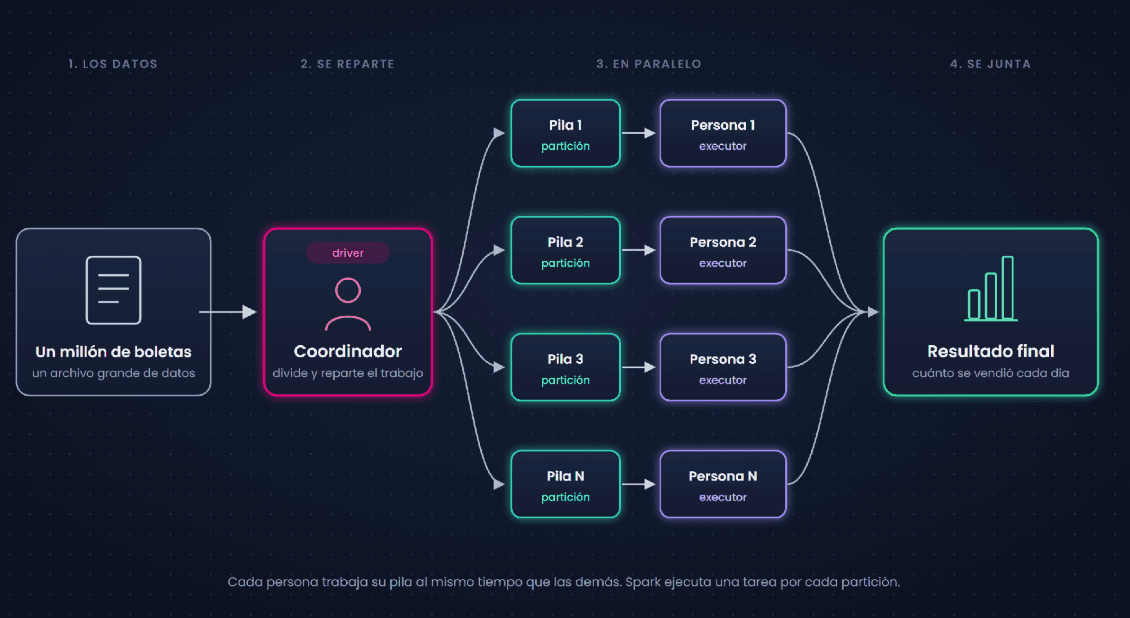
Imagine you have to review a million sales receipts to find out how much was sold each day. If you split the piles among ten people and at the end add up what each one counted, you finish in a fraction of the time.
That is Apache Spark. A tool that divides a large job with data into small parts, processes them at the same time, and combines the results. The official documentation defines it as "a unified analytics engine for large-scale data processing" (Apache Software Foundation, 2026a).
2.1. When data no longer fits on a single computer
An Excel spreadsheet holds a maximum of 1,048,576 rows (Microsoft, n.d.), and the taxi file in our lab, for a single month, has 3,475,226. Exceeding that limit does not mean you need Spark.
On the same computer, pandas read that file and calculated trips per day in 1.7 seconds. Spark is justified when the data or processing times exceed what a single machine can handle, and then it distributes the work across multiple computers.
2.2. How the work is organized
Someone coordinates and distributes the piles, and each person counts theirs at the same time as the others. In Spark, the coordinator is called the driver, the piles are partitions, and the people counting are the executors (Apache Software Foundation, 2026b).
2.3. When you don't need Spark
With 50 receipts, splitting them among ten people takes longer than counting them yourself. The same happens with Spark. If your data fits comfortably on a single machine, Excel, pandas, or a database are usually simpler.
3. The differences between PySpark, Spark SQL, and Scala: what each one is
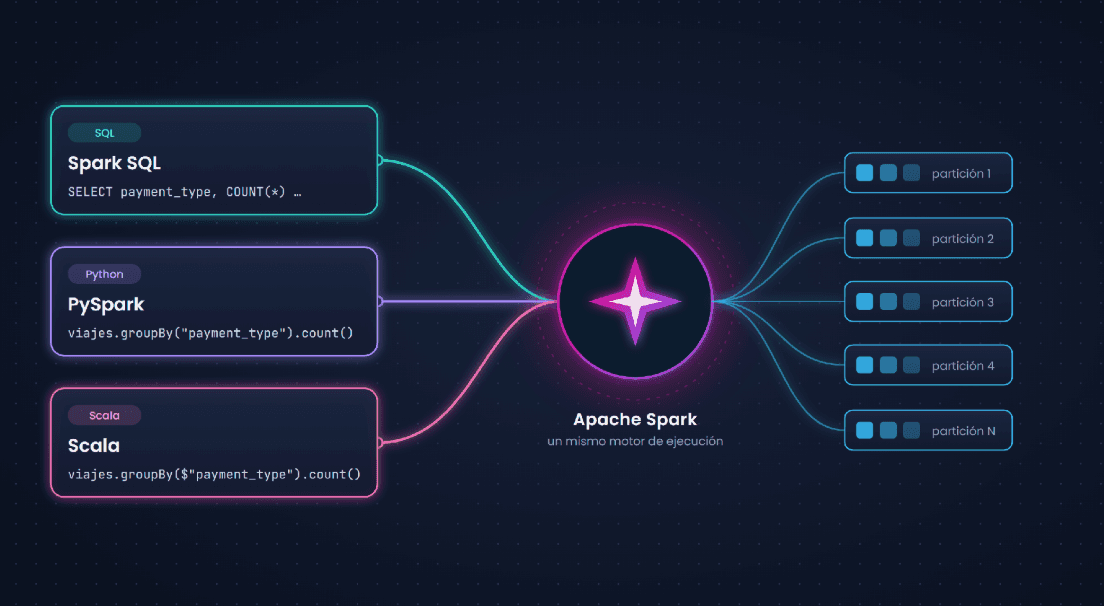
Before comparing them, it is important to clarify that the three names are not the same type of thing. Spark SQL is the part of Spark that processes data in table form, while Python (with PySpark) and Scala are languages from which you give it instructions.
Therefore, comparing "Spark SQL versus PySpark" means comparing a SQL query with the same calculation written in Python. According to the documentation, "the same execution engine is used, regardless of which API or language you use to express the computation" (Apache Software Foundation, 2026c). An API is the way one program asks another for something.
3.1. Spark SQL: you say what you want and Spark decides how
You can give Spark SQL instructions with SQL queries or with DataFrames, which are tables split into pieces and managed from Python or Scala (Apache Software Foundation, 2026c).
Inside, Catalyst, the optimizer, does the work. You say what result you want and Catalyst builds an optimized plan to calculate it (Armbrust et al., 2015). If you come from databases, this is your natural entry point.
3.2. PySpark: Spark from Python
PySpark is the way to use Spark from Python. With DataFrames, the heavy lifting is not done by Python. Python only describes the task to Spark, and it is executed by the same engine used by SQL.
If you come from pandas, keep in mind that Spark records the steps and only executes them when you request the result.
3.3. Scala: Spark's native language
Scala is the language in which Spark was written from its origin (Zaharia et al., 2010), which is why it is called its native language.
It also has Datasets, which Python does not have. In a DataFrame, column names are text strings that Spark checks when analyzing the query. In a Dataset, each row is an object of a class written in the code, and the compiler can detect certain errors, such as a misspelled field, before the program starts.
According to the documentation, Datasets exist in Scala and Java, and "Python does not have support for the Dataset API" (Apache Software Foundation, 2026c). If you come from Java or software development, Scala will feel natural to you. If not, it takes longer to learn.
| Spark SQL | PySpark | Scala | |
|---|---|---|---|
| What it is | The part of Spark that processes tables; used with SQL queries | The way to use Spark from Python | The language in which Spark was written |
| Profile for whom it feels most natural | Analysts and SQL profiles | Engineers and data scientists in Python | Data and software engineers |
| When it detects a misspelled column | When analyzing the query, before processing rows | When analyzing the query, before processing rows | With Dataset, certain errors at compile time; with DataFrame, when analyzing the query |
| Example: trips by payment type | SELECT payment\type, COUNT(\*) FROM viajes GROUP BY payment\type | viajes.groupBy("payment\_type").count() | viajes.groupBy(\$"payment\_type").count() |
4. Are they so different? We checked in a lab
To verify this, we set up a lab with Docker, which makes it possible to reproduce the same environment on any computer.
- Apache Spark 4.2.1 (released on October 27, 2026), with Scala 2.13.18 and Java 21, in local mode and with the default configuration. We used the official Spark 4.2.0 image from Docker Hub, updated with the official Apache 4.2.1 package, and Python 3.10 with pandas 2.2.3 and pyarrow 18.1.0.
- A single computer with an AMD Ryzen 7 7730U processor (8 cores and 16 threads) and 23 GB of RAM, with Docker limited to 11 GB. Spark used all 16 threads.
- We did not cache data, so each measurement reads the file again. Before measuring each variant, we ran a warm-up run that is not counted.
- New York yellow taxi trips from January 2025, published by the NYC Taxi & Limousine Commission (3,475,226 rows). They are public data and do not belong to any client.
- The tests were run on October 29 and 30, 2026.
- The complete scripts, the Dockerfile, and the outputs are in this GitHub repository.
4.1. The same query, the same plan
First we loaded the file and named it viajes, so we could also use it from SQL.
Data preparation:
Python
viajes = spark.read.parquet("yellow_tripdata_2025-01.parquet")
viajes.createOrReplaceTempView("viajes")
Then we wrote the same query (trips and average fare per day) in all three forms.
The query in Spark SQL:
SQL
-- Spark SQLSELECT to_date(tpep_pickup_datetime) AS dia,COUNT(*) AS total_viajes,ROUND(AVG(fare_amount), 2) AS tarifa_promedioFROM viajesWHERE trip_distance > 0GROUP BY dia
The same query in PySpark:
Python
# PySpark
from pyspark.sql import functions as F
viajes.where(F.col("trip_distance") > 0) \
.groupBy(F.to_date("tpep_pickup_datetime").alias("dia")) \
.agg(F.count("*").alias("total_viajes"),
F.round(F.avg("fare_amount"), 2).alias("tarifa_promedio"))
The same query in Scala:
Scala
// Scala (in spark-shell; the $"column" come from spark.implicits._)
import org.apache.spark.sql.functions._
viajes.where($"trip_distance" > 0)
.groupBy(to_date($"tpep_pickup_datetime").alias("dia"))
.agg(count("*").alias("total_viajes"),
round(avg($"fare_amount"), 2).alias("tarifa_promedio"))
Then we asked Spark for its physical plan, the list of steps it will execute, like a final recipe (Apache Software Foundation, 2026e). To compare them, we replaced the internal identifiers, such as fare\_amount\#10, with \#id. There is no need to understand every line, only to see that in this experiment the recipe came out identical in all three cases. The file read is truncated, and the last three lines are printed by our script.
The physical plan Spark showed:
Output
AdaptiveSparkPlan isFinalPlan=false
+- HashAggregate(keys=[_groupingexpression#id], functions=[count(1), avg(fare_amount#id)], output=[dia#id, total_viajes#id, tarifa_promedio#id])
+- Exchange hashpartitioning(_groupingexpression#id, 200), ENSURE_REQUIREMENTS, [plan_id=N]
+- HashAggregate(keys=[_groupingexpression#id], functions=[partial_count(1), partial_avg(fare_amount#id)], output=[_groupingexpression#id, count#id, sum#id, count#id])
+- Project [fare_amount#id, cast(tpep_pickup_datetime#id as date) AS _groupingexpression#id]
+- Filter (isnotnull(trip_distance#id) AND (trip_distance#id > 0.0))
+- FileScan parquet [tpep_pickup_datetime#id,trip_distance#id,fare_amount#id] ... PushedFilters: [IsNotNull(trip_distance), GreaterThan(trip_distance,0.0)] ...
IDENTICAL PLANS: True
IDENTICAL RESULTS: True | rows: 33
SCALA PLAN IDENTICAL TO PYTHON/SQL: true
The first line indicates that Spark uses Adaptive Query Execution (AQE), enabled by default since Spark 3.2.0, which adjusts the plan with real statistics while processing (Apache Software Foundation, 2026h). We compared the plan before execution. At the end, it showed AQEShuffleRead coalesced, because Spark merged small partitions on the fly.
The result has 33 rows instead of 31 because the January file includes trips with a different start date, 21 from December 31, 2024, and one from February 1, 2025. It is not a time zone offset, because that column is stored without a time zone. We left them because they do not change the comparison, but in a real process it is advisable to filter by the period.
4.2. Where Python does cost: custom functions (UDFs)
A UDF (user-defined function) is a function you write when Spark does not include one that does what you need (Apache Software Foundation, 2026g). We calculated the fare per mile in four different ways and measured each one 10 times, in two runs.
The four lab variants:
Python
import pandas as pd
from pyspark.sql import functions as F
from pyspark.sql.functions import udf, pandas_udf
# 1. Native Spark function
nativa = F.when(F.col("trip_distance") > 0, F.col("fare_amount") / F.col("trip_distance"))
# 2. The same logic as a Python UDF
def tarifa_por_milla(tarifa, distancia):
if tarifa is None or distancia is None or distancia <= 0:
return None
return tarifa / distancia
udf_clasica = udf(tarifa_por_milla, "double", useArrow=False) # row by row
udf_arrow = udf(tarifa_por_milla, "double", useArrow=True) # 3. default in Spark 4.2
# 4. pandas UDF: receives full columns in batches
@pandas_udf("double")
def tarifa_por_milla_pandas(tarifa: pd.Series, distancia: pd.Series) -> pd.Series:
return (tarifa / distancia).where(distancia > 0)
# Each variant was measured like this (10 repetitions, taking the median):
viajes.select(nativa.alias("x")).agg(F.count("x"), F.sum("x")).collect()
| Variant | Median run 1 | Median run 2 | Result |
|---|---|---|---|
| Native Spark function | 0.28 s | 0.29 s | 46,374,751.50 |
| Classic Python UDF (row by row) | 1.55 s | 1.48 s | 46,374,751.50 |
| Python UDF with Arrow | 1.23 s | 1.26 s | 46,374,751.50 |
| pandas UDF (batch) | 0.65 s | 0.62 s | 46,374,751.50 |
All four variants produced the same result, but in these measurements the classic UDF took about five times longer than the native one, and the pandas UDF was the fastest of the three UDFs.
The reason is that the classic UDF is a black box for Catalyst. The optimizer cannot see what the Python code does, and each row must be converted to pass from one process to another (Apache Software Foundation, 2026g). The pandas UDF uses Arrow to transfer the data and pandas to process it, "which enables vectorized operations" over full columns (Apache Software Foundation, 2026i).
To see it in the plan, we filtered by the result (fare per mile greater than 10). With the native function, the filter was applied in the same stage that reads the file. With the UDF it remained outside the read, and the BatchEvalPython step appears twice because Spark calculated the UDF twice.
The filter on the UDF and its plan (trimmed):
Python
viajes.select(udf_clasica("fare_amount", "trip_distance").alias("x")).where(F.col("x") > 10)
Output
*(3) Project [pythonUDF0#id AS x#id]
+- BatchEvalPython [fare_per_mile(fare_amount#id, trip_distance#id)#id], [pythonUDF0#id]
+- *(2) Project [trip_distance#id, fare_amount#id]
+- *(2) Filter (pythonUDF0#id > 10.0)
+- BatchEvalPython [fare_per_mile(fare_amount#id, trip_distance#id)#id], [pythonUDF0#id]
+- *(1) ColumnarToRow
+- FileScan parquet [trip_distance#id,fare_amount#id] ... DataFilters: [] ...
In Spark 4.2, Python UDFs use Arrow by default (Apache Software Foundation, 2026f), which is why to measure the classic one we specify useArrow=False.
4.3. When a typo is detected
Finally, we deliberately misspell the name of a column (PULocationId\_typo instead of PULocationID, the zone where the trip starts).
The typo in PySpark and Spark SQL:
Python
# PySpark
trips.groupBy("PULocationId_typo").count().show(3)
# Spark SQL
spark.sql("SELECT PULocationId_typo, COUNT(*) FROM trips GROUP BY PULocationId_typo").show(3)
The same error in Scala:
Scala
// Scala with DataFrame: the column name is a string
trips.groupBy($"PULocationId_typo").count().show(3)
// Scala with Dataset: each field is part of the Trip class
case class Trip(PULocationID: Long, fare_amount: Double, trip_distance: Double)
val ds = trips.select($"PULocationID".cast("long"), $"fare_amount", $"trip_distance").as[Trip]
ds.groupByKey(v => v.PULocationId_typo).count()
What each one responded:
Output
[PySpark] error while building the query: UNRESOLVED_COLUMN.WITH_SUGGESTION | jobs launched on the rows: 0
[Spark SQL] error while building the query: UNRESOLVED_COLUMN.WITH_SUGGESTION | jobs launched on the rows: 0
[Scala DataFrame] error while building the query: UNRESOLVED_COLUMN.WITH_SUGGESTION | jobs launched on the rows: 0
Scala Dataset, compiler message (nothing is executed):
error: value PULocationId_typo is not a member of Trip
Compiling is the prior review of the program, before it starts. In this lab, PySpark, Spark SQL, and Scala with DataFrame detected the error while analyzing the query, before processing the rows (no job was launched on them), and Spark suggested the correct name. Even so, that happens with the program already running, when it reaches that query. The Scala Dataset detected it earlier, at compile time.
That does not mean the compiler detects all errors. Inside a Dataset, a column written as a string, for example \$"PULocationId\_typo", is still checked while analyzing the query, just as in a DataFrame.
That safety has a cost with custom functions, because Spark creates a Trip object for each row and Catalyst does not see inside the function.
With DataFrame, the filter trip\distance \> 0 was pushed to the file read (PushedFilters: \[IsNotNull(trip\distance), GreaterThan(trip\distance,0.0)\]). With ds.filter(v \=\> v.trip\distance \> 0\) it did not happen (PushedFilters: \[\]), although in our file the time difference was small, from 0.16–0.17 s to 0.18–0.21 s.
| Claim | What we observed | Result |
|---|---|---|
| The three forms generate the same plan | Identical physical plan in SQL, PySpark, and Scala | It held in this experiment |
| Python is slower | The classic UDF took about five times longer than the native function; with DataFrames, the plan was the same | It depends on whether you use custom functions (UDFs) in Python. With DataFrames or SQL, in this experiment we obtained the same plan |
| Scala detects errors earlier | With Dataset, the error appeared at compile time; with DataFrame, PySpark, and SQL, while analyzing the query, before processing rows | It depends on whether you use Dataset, and only for certain errors. With DataFrame, Scala detects it at the same moment as Python and SQL |
5. How to choose based on the differences between PySpark, Spark SQL, and Scala
With these results, for common queries the question stops being which one is faster and becomes which one fits your team.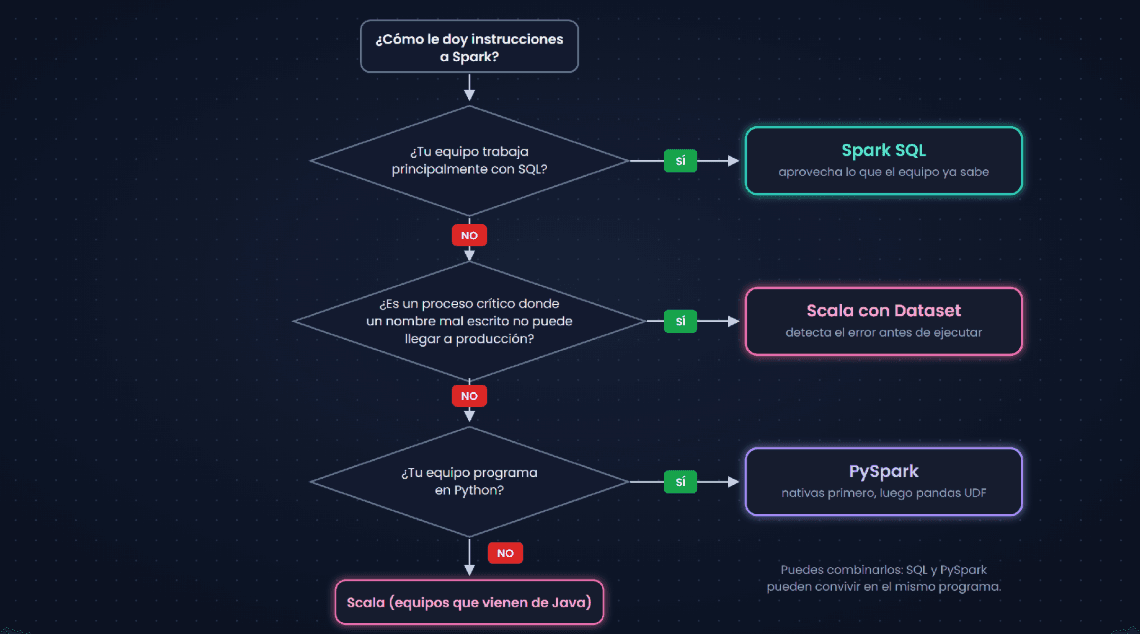
5.1. By type of work
For transformations and reports, in this experiment Spark SQL and DataFrames in PySpark generated the same plan, so it is best to choose based on what your team reads and maintains best.
If you need logic that Spark doesn't provide, look for a native function first. If none exists, compare the alternatives with your own logic and data, because here the pandas UDF was the fastest UDF, but that can change depending on the computation.
In critical processes, Scala with Dataset adds a compile-time check that catches certain errors, such as a misspelled field, before reaching production. It's better to use it with columns rather than with custom functions, because of the cost we saw.
5.2. You don't have to choose just one
In practice, all three coexist. From a Python program you can prepare the data, give the table a name, and query it with SQL.
SQL and Python in the same program:
Python
from pyspark.sql import functions as F
trips_with_day = trips.withColumn("day", F.to_date("tpep_pickup_datetime")) # Python
trips_with_day.createOrReplaceTempView("trips_with_day") # name for SQL
summary = spark.sql("""
SELECT day, COUNT(*) AS total_trips
FROM trips_with_day
GROUP BY day
""") # SQL
6. Application in companies and best practices
6.1. Business benefits
Choosing well is also a business decision. Leveraging what the team already knows speeds up delivery, and avoiding unnecessary UDFs can reduce cloud compute costs.
In banking and fintech, fraud monitoring can combine rules that analysts write in SQL with models that the data team maintains in Python, on the same engine. Those migrating their ETL processes can move nightly loads to Spark without retraining the entire team. Both cases align with the uses Kranio describes on its Spark page (Kranio, n.d.).
If you want to see how this fits into an ETL or ELT flow, check out our article ETL vs ELT: differences, use cases, and best tools.
6.2. Best practices
- Prefer native functions over UDFs. If you need one in Python, measure alternatives such as the pandas UDF with your logic and data before choosing.
- Before optimizing, review the plan with explain(), the instruction that shows the steps Spark will take.
- Pin the Spark version and review its known issues. With 4.2.0, our UDFs with Arrow hung due to error SPARK-58241, fixed in 4.2.1 (Apache Software Foundation, 2026d).
7. Conclusion: what to use and when
The differences between PySpark, Spark SQL, and Scala did not appear in common queries, because in this experiment, with DataFrames or SQL, the plan and the result were the same. They did appear in Python's custom functions and in Scala's type checking. With that in mind, the choice is as follows:
- If your team works mainly with SQL, start with Spark SQL and leverage what it already knows.
- If you program in Python, use PySpark, prefer native functions, and when you need a UDF, measure the alternatives with your data.
- If you come from Java, or if in critical processes you want the compiler to catch certain errors before execution, consider Scala with Dataset.
7.1. What we tested and what's left out
Everything was tested on a single machine, with Spark 4.2.1 and a single file. A real cluster, stream processing, and Spark Connect were left out, where plans and times can change, so it's worth repeating the measurements in your environment.
Implementing Apache Spark with the right language not only improves technical efficiency but also allows companies to process more data in less time, reduce compute costs, and scale their pipelines safely and sustainably. At Kranio we have teams specialized in Apache Spark that have implemented this type of solution in real enterprise projects.
👨💻 If your company is looking to implement this type of solution, you can contact us at 👉 www.kranio.io
References
- Apache Software Foundation. (2026a). Spark overview (version 4.2.1). https\://spark.apache.org/docs/4.2.1/
- Apache Software Foundation. (2026b). Cluster mode overview (version 4.2.1). https\://spark.apache.org/docs/4.2.1/cluster-overview.html
- Apache Software Foundation. (2026c). Spark SQL, DataFrames and Datasets guide (version 4.2.1). https\://spark.apache.org/docs/4.2.1/sql-programming-guide.html
- Apache Software Foundation. (2026d). SPARK-58241: Columnar Arrow Python UDF runner writes the input schema in the legacy protocol position, hanging the worker. Apache JIRA. https\://issues.apache.org/jira/browse/SPARK-58241
- Apache Software Foundation. (2026e). EXPLAIN (version 4.2.1). https\://spark.apache.org/docs/4.2.1/sql-ref-syntax-qry-explain.html
- Apache Software Foundation. (2026f). Upgrading PySpark (version 4.2.1). https\://spark.apache.org/docs/4.2.1/api/python/migration\guide/pyspark\upgrade.html
- Apache Software Foundation. (2026g). Chapter 5: Unleashing UDFs & UDTFs (PySpark 4.2.1). https\://spark.apache.org/docs/4.2.1/api/python/user\_guide/udfandudtf.html
- Apache Software Foundation. (2026h). Performance tuning (version 4.2.1). https\://spark.apache.org/docs/4.2.1/sql-performance-tuning.html
- Apache Software Foundation. (2026i). Apache Arrow in PySpark (PySpark 4.2.1). https\://spark.apache.org/docs/4.2.1/api/python/tutorial/sql/arrow\_pandas.html
- Armbrust, M., Xin, R. S., Lian, C., Huai, Y., Liu, D., Bradley, J. K., Meng, X., Kaftan, T., Franklin, M. J., Ghodsi, A., & Zaharia, M. (2015). Spark SQL: Relational data processing in Spark. In Proceedings of the 2015 ACM SIGMOD International Conference on Management of Data (pp. 1383–1394). https\://doi.org/10.1145/2723372.2742797
- Kranio. (n.d.). Apache Spark. https\://www.kranio.io/technologies/apache-spark-tech
- Microsoft. (n.d.). Excel specifications and limits. Microsoft Support. https\://support.microsoft.com/es-es/office/especificaciones-y-l%C3%ADmites-de-excel-1672b34d-7043-467e-8e27-269d656771c3
- NYC Taxi & Limousine Commission. (n.d.). TLC trip record data. https\://www.nyc.gov/site/tlc/about/tlc-trip-record-data.page
- Zaharia, M., Chowdhury, M., Franklin, M. J., Shenker, S., & Stoica, I. (2010). Spark: Cluster computing with working sets. In 2nd USENIX Workshop on Hot Topics in Cloud Computing (HotCloud 10\). USENIX Association. https\://www.usenix.org/conference/hotcloud-10/spark-cluster-computing-working-sets
Previous Posts
Strangler Fig: how to migrate from a monolith to microservices
Discover how to apply the Strangler Fig pattern to migrate from a monolith to microservices gradually, reduce risks, and keep the business operational.
Data Lake or Data Warehouse? Which to Choose and the Differences
Data Lake or Data Warehouse? Learn about their architectural differences, costs, real-world use cases, and how the Lakehouse unites the best of both worlds.