
Archify: How to review architecture diagrams with AI

An agent can generate an architecture diagram in minutes: boxes, arrows, and an image ready to accompany a pull request. The problem arises when someone asks what supports one of those connections and the diagram cannot answer it.
A visually convincing result can represent a relationship that the system does not have. Therefore, before using it in a technical review, it is advisable to check what information the agent received, what assumptions it incorporated, and what evidence supports what was drawn.
In this article we explore that practice with Archify, an open-source tool with an MIT license. We will use two hypothetical examples to distinguish what the tool validates, what the team must review, and what information should be preserved.
Validating a diagram is not the same as auditing an architecture
When reviewing an AI-generated diagram, it is advisable to separate three aspects:
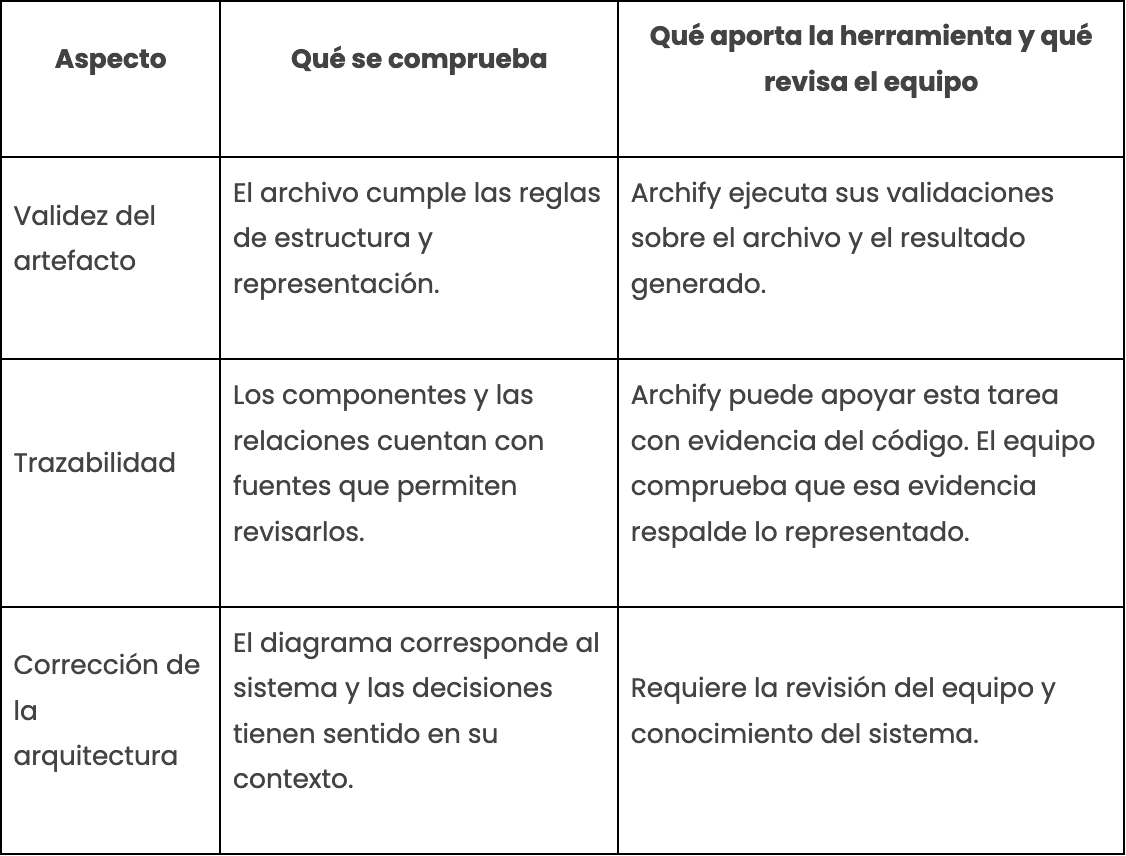
A valid diagram can contain an incorrect relationship. The fact that the file passes the tool's checks does not prove that a connection exists in the code or in the infrastructure.
When code evidence is incorporated, Archify can also verify that the cited files and line ranges exist in a given commit. Even so, it is up to the team to assess whether those references justify the relationship and whether the representation is appropriate for the review.
What Archify does
Archify works with a three-step flow:
- Generate: the agent creates a JSON file that describes the diagram.
- Validate: the tool checks that the file complies with the applicable rules.
- Deliver: if it passes the checks, it generates a self-contained HTML file that can be opened without a server.
To install the skill:
npx skills add tt-a1i/archify -gOnce installed in a compatible agent, the diagram can be requested from its chat. There is no need to manually run the commands for each request. The doctor, validate, and deliver utilities allow you to diagnose problems or integrate the flow into other processes.
The installation options depend on the environment, so it is advisable to review the project documentation before starting.
The examples in this article were generated on October 7, 2026, with Archify v3.0.1, commit 2ab3cae. The diagrams are presented here as static images.
Basic example: cache and database
The first example starts from a brief request included in the Archify README:
Use Archify to draw: Browser -> API -> Redis cache -> PostgreSQL fallback.This is a hypothetical scenario with four components: browser, API, Redis, and PostgreSQL.
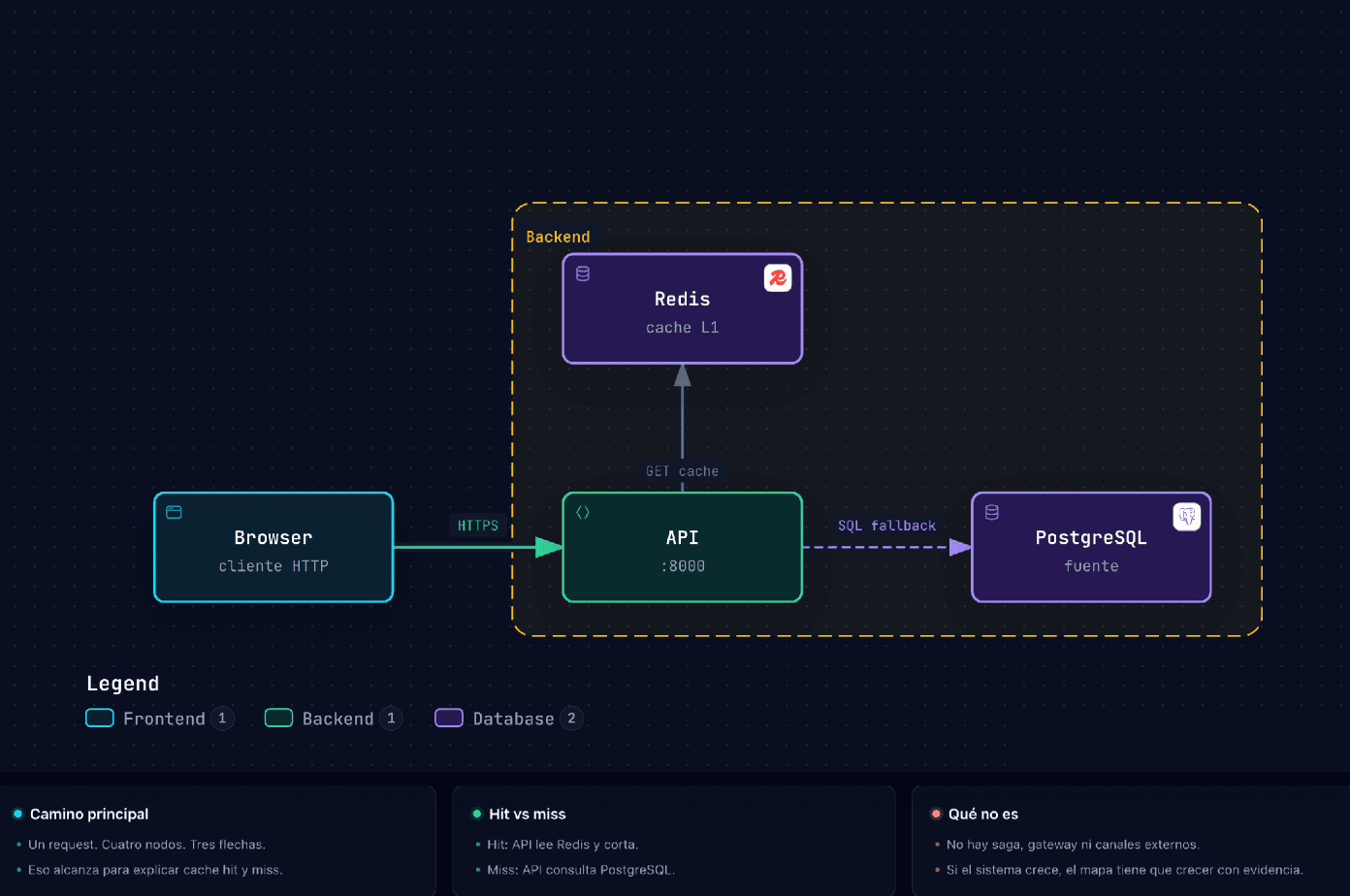
The browser calls the API. The API queries Redis and, if it does not find the data, queries PostgreSQL.
This example allows us to observe a first decision by the agent. Although the request chains Redis cache -> PostgreSQL fallback, the result connects both components to the API.
That interpretation may be reasonable for the scenario, but it is still a decision that must be made explicit and reviewed. If the goal were to document an existing system, it would be necessary to check in its implementation who performs each query.
The useful question is: does this connection come from a source or from an interpretation by the agent?
Checkout: representing a flow without inventing connections
The second example represents a checkout. It is also hypothetical and does not correspond to a client's architecture.
An overly open instruction can lead the agent to incorporate connections that we do not want to represent. To delimit the result, this request was used:
Checkout runtime map. Maximum 12 nodes.
Clients → gateway → orchestrator. The orchestrator publishes to the bus.
Participants: stock, payment, shipping. Channel webhook to the orchestrator.
Do not draw REST orchestrator → payment. JWT only in gateway and orders.
Support in cards.
In the diagram, orders is the component called "orchestrator". The request enters through the gateway and orders publishes pedido.creado to the bus.
For reading the example, stock, charging, and shipping consume that same event. The labels reservar, cobrar, and enviar describe the action of each service; they do not represent three different events or orders issued by the bus.
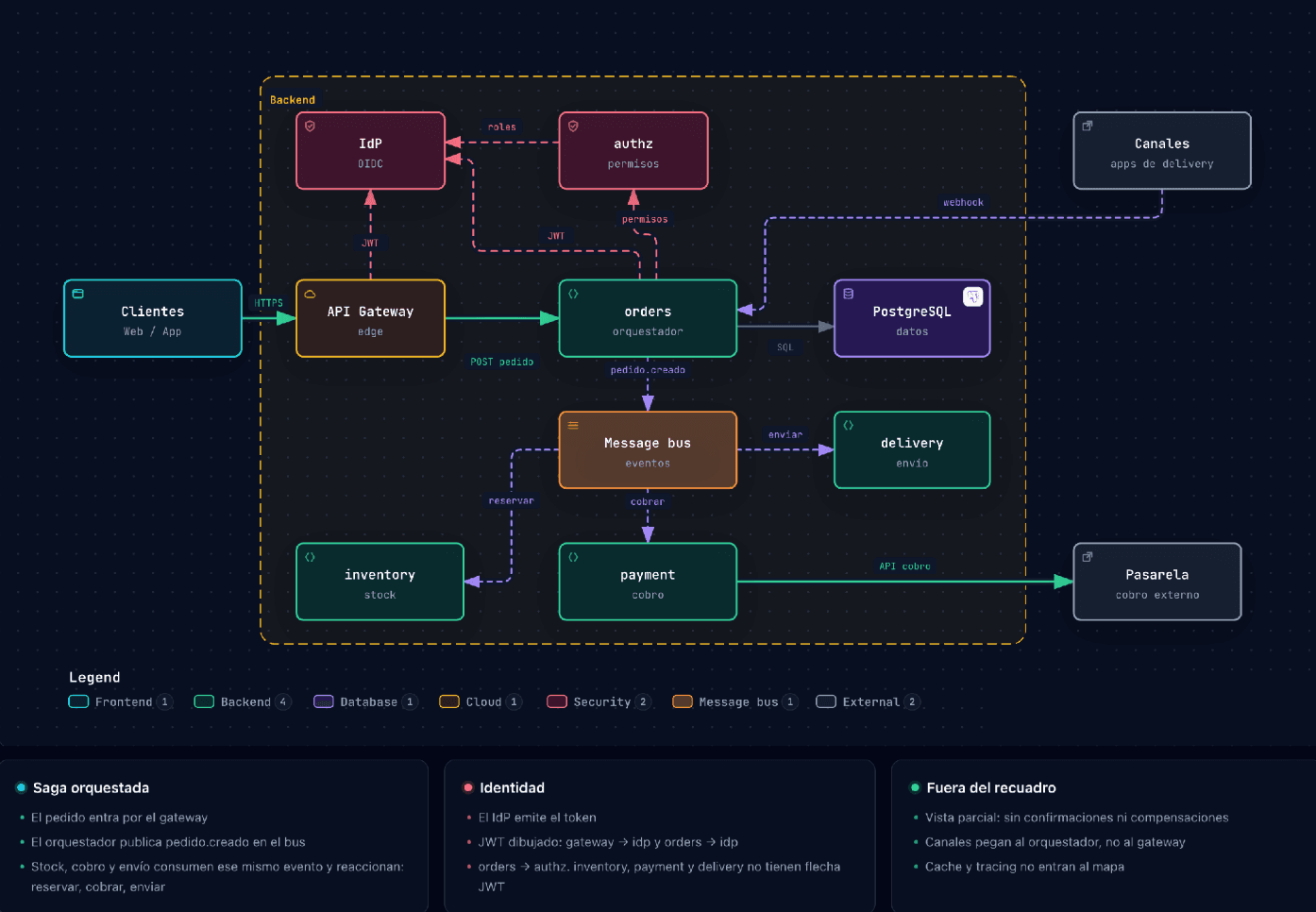
Partial view of the checkout. It does not include confirmations, compensations, or the complete coordination of the process. The JWT connections contain an assumption pending confirmation, explained later.
Solid lines represent direct calls. Dashed lines are used for events, the webhook, and identity relationships; their labels allow them to be distinguished.
A central constraint of the example is that there is no direct REST call from orders to payment. The webhook from the channels, in turn, must reach orders and not the gateway.
How the result was reviewed
The agent received the above request without access to code. First, Archify validated the artifact. Then, some constraints from the request were compared against the connections described in the JSON.
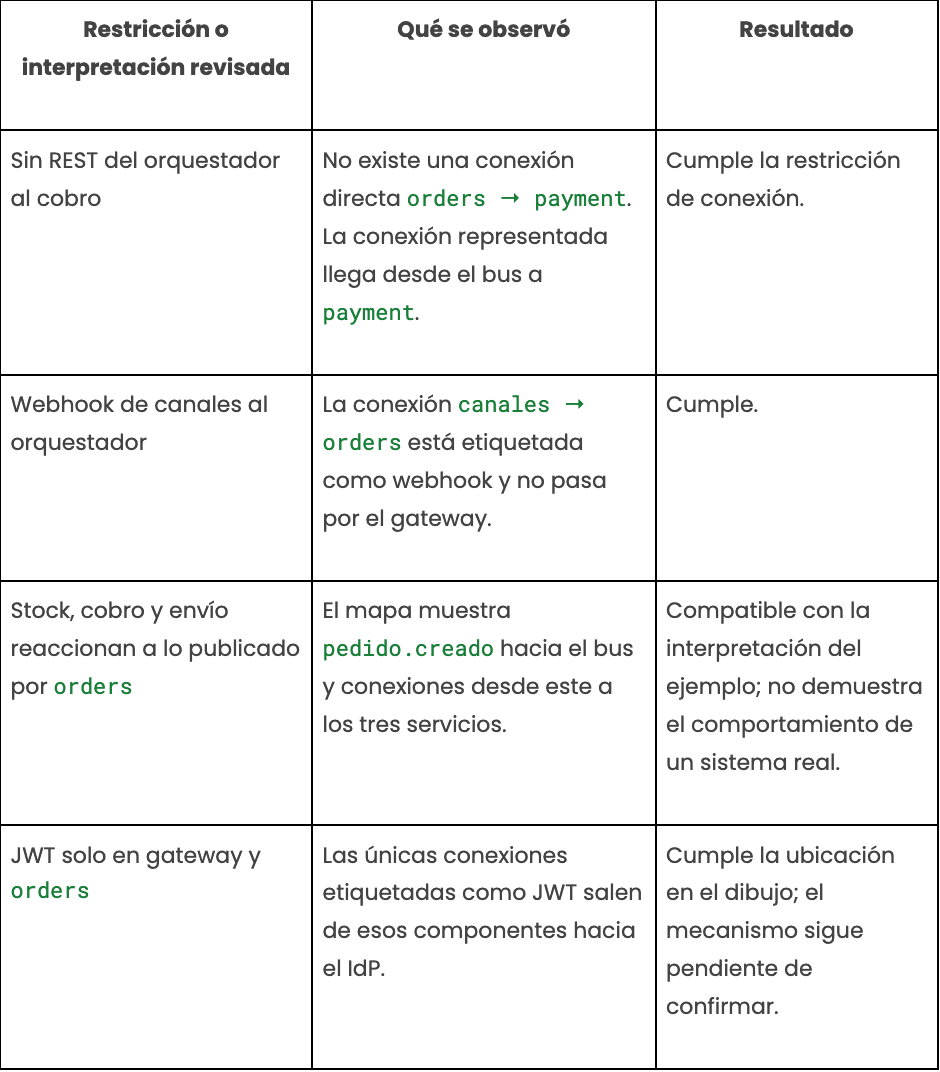
These objects correspond to three connections in the JSON. The label position fields are omitted:
[
  {
    "id": "orders-bus",
    "from": "orders",
    "to": "bus",
    "label": "pedido.creado",
    "variant": "dashed"
  },
  {
    "id": "bus-payment",
    "from": "bus",
    "to": "payment",
    "label": "cobrar",
    "variant": "dashed"
  },
  {
    "id": "gateway-idp",
    "from": "gateway",
    "to": "idp",
    "label": "JWT",
    "variant": "security"
  }
]
The fragments allow those connections to be inspected. To verify that no other relationship exists—such as a direct call from orders to payment—it is necessary to review the complete file.
What the validator confirmed
Validation of the complete file with the showcase profile produced the following summarized result:
ok: true
command: validate
type: architecture

Controles reportados:
single_svg, finite_svg, orthogonal_arrows,
label_route_clearance, relationship_crossings,
relationship_corridors, container_border_runs,
route_rhythm, legend_clearance

Resultado de esos controles: ok: true

composition:
  profile: showcase
  status: pass
  errors: 0
  warnings: 0
This block summarizes the validator output; it does not literally reproduce its JSON.
The controls check aspects of structure and representation: for example, the geometry of the arrows and the separation between labels and routes. They do not verify that the relationships exist in a real system.
To test that difference, a REST arrow orders → payment, expressly prohibited in the request, was manually added to the JSON.
In this test, the standard profile accepted the file with zero errors and one composition warning. The showcase profile rejected it due to a label overlap, not for contradicting the architectural constraint.
The test shows why automated validation must be complemented by a review of what each connection means.
An assumption detected: the JWT connections
The request stated "JWT only in gateway and orders," but did not define the validation mechanism.
The agent drew a connection from each component to the identity provider, identified as IdP. That representation can be interpreted as a query to the IdP, although the instruction did not specify that behavior.
The diagram also does not allow determining whether the services validate the token locally or perform a remote query.
Therefore, the mechanism was left as an assumption pending confirmation. It was not considered validated simply because the arrows appeared in the requested components.
In a real system, that question should be resolved by consulting the implementation, the configuration, or a documented architecture decision. Meanwhile, the uncertainty must remain visible to whoever reviews the map.
What this review demonstrates and what remains pending
The review verified some relationships against the original request. It did not verify their correspondence with code or with a running system.
To move toward that verification, it would be necessary to review, among other points:
- Where and under what conditions
orderspublishespedido.creado. - What configuration or implementation demonstrates that
paymentconsumes that event. - How the token is validated at the gateway and in
orders. - What happens when any stage fails and how process continuity is coordinated.
The example is intended to practice a review and detect assumptions. It does not constitute a checkout architecture ready for implementation.
What evidence should be kept
So that another person can repeat the review, it is advisable to keep the following alongside the diagram:
- The complete JSON, the version of Archify used, and the validator output.
- The original request and the sources received by the agent.
- The reviewed relationships, indicating the file, configuration, or decision that supports each one.
- Pending assumptions, clearly differentiated from verified relationships.
When the sources are files from a repository, identifying the commit makes it possible to preserve the exact context of the review.
When to use Archify
Archify can be useful when the team needs to maintain an editable source of the diagram, review its relationships, and keep the result alongside the code.
For a high-level view, the documentation suggests focusing on about eight to twelve components and one main flow. This is a guideline to facilitate reading, not a universal rule.
It also allows comparing versions of an architecture and representing changes. That comparison does not, by itself, determine operational impact or whether a change is safe for production.
Among the limitations of the version used:
- It does not automatically interpret Mermaid diagrams.
- It does not offer a general visual editor or hosting for the maps.
- It does not inspect running infrastructure.
- The
guidecommand provides guidance on the type of diagram, but does not generate it.
The choice of diagram type also matters. Architecture, workflow, sequence, data flow, and lifecycle answer different questions. A component map can be valid and still be insufficient to explain the order of calls.
How it compares with other tools
The choice depends on the artifact the team needs:
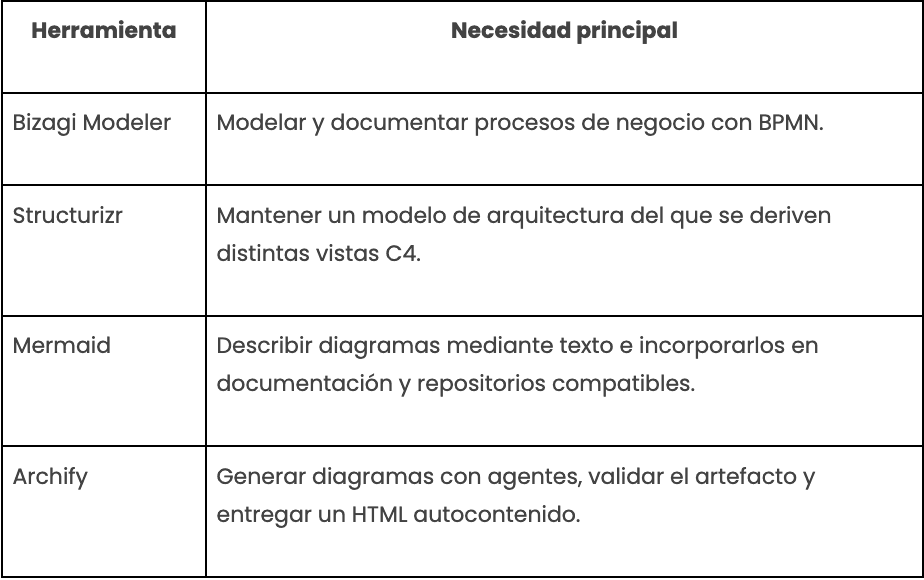
Archify does not replace a BPMN model or interpret Mermaid. Its contribution should be evaluated according to the workflow and the result being sought.
In all cases, there is human work of definition, review, and maintenance. This exercise did not measure cost differences between the tools.
What the team should take away
An AI-generated diagram is useful when it makes it possible to explain the system and review its relationships. Its appearance is not enough to trust it.
Archify validates the artifact and can support traceability when code evidence is incorporated. The team remains responsible for verifying that the sources support the connections and that the architecture makes sense in its context.
The practice worth adopting is concrete: identify where each relationship comes from, review the assumptions, and leave visible the doubts that have not yet been resolved.
This need connects with what is raised in Kranio's article on spec-driven coding with AI: when generating a plausible implementation becomes faster, validation takes on a central role.
Is your team incorporating agents into its architecture reviews? Let's talk about how to apply this practice in your organization.
References
- Bizagi. (n.d.). Free: Getting started with Bizagi Modeler. Bizagi Modeler Documentation.
- Bizagi. (2023, November 27). Standards compatability. Bizagi Modeler Documentation.
- Gonzáles, P. (2026, June 1). Spec-driven coding with AI: a practical guide for teams. Kranio.
- tt-a1i. (2026a). Archify \[Software\]. GitHub.
- tt-a1i. (2026b). Authoring cookbook. Archify Documentation.
- Structurizr. (n.d.). Structurizr \[Software\]. GitHub.
Previous Posts

Patterns and Anti-Patterns in Unit Testing with JUnit and Mockito
Discover the main patterns and antipatterns in unit testing with JUnit and Mockito to create cleaner, more maintainable, and reliable tests.
ETL vs ELT: Differences, Use Cases, and Best Tools
ETL or ELT? Learn their differences, advantages, top modern tools, and practical use cases explained clearly and without complications.